



Description
Download Ashampoo Photo Optimizer 11 – photo editing, automatic optimization, LUTs, portrait enhancement, creative effects
Overview
Ashampoo Photo Optimizer 11 is a comprehensive photo editing tool designed to streamline image enhancement for users of all skill levels. The application addresses common photographic challenges such as poor exposure, low contrast, and inaccurate color balance, delivering polished results with minimal effort. Its primary purpose is to transform average or underexposed photos into visually striking images through intelligent automation and intuitive controls. This makes it particularly valuable for amateur photographers, social media content creators, and anyone who frequently shares images on digital platforms.
The software targets individuals seeking a fast yet powerful solution for post-processing without the steep learning curve associated with professional-grade editors. While the developer, Ashampoo, is known for creating accessible utility software, specific background details about the company were not provided. Real-world use cases include enhancing family photos, preparing images for online portfolios, and refining travel snapshots for immediate sharing. In the broader app ecosystem, Ashampoo Photo Optimizer 11 fills a niche by offering a balanced mix of automation and manual control, making it a practical choice for users who value efficiency and creative flexibility.
Key Features & Functionality
- One-Click Optimization: Analyzes images for exposure, contrast, and color balance, then applies corrections automatically. Ideal for batch processing entire folders or single images in seconds.
- Over 45 LUTs: Includes professionally crafted Lookup Tables that instantly alter the mood and tone of photos, enabling users to apply warm, cool, or retro color palettes with a single selection.
- User-Friendly Manual Editing: Offers a range of tools for perspective correction, horizon straightening, and custom effect application, all accessible through an intuitive interface that requires no prior training.
- Portrait Enhancement Tools: Features dedicated functions for red-eye removal, blemish correction, and spot removal, ensuring facial details are refined with precision.
- Creative Effects Suite: Provides aging filters, overlays, and oil painting styles, allowing users to experiment with artistic transformations and personalize their images.
These features cater to both beginners and intermediate users. For example, a user can quickly enhance a group photo with one click, then later apply a vintage LUT to evoke a nostalgic feel. Similarly, a content creator might use manual tools to straighten a crooked shot before applying an oil painting effect for a unique social media post. The combination of automation and creative control ensures that users can achieve professional-quality results without extensive technical knowledge.
Interface, UX & Performance
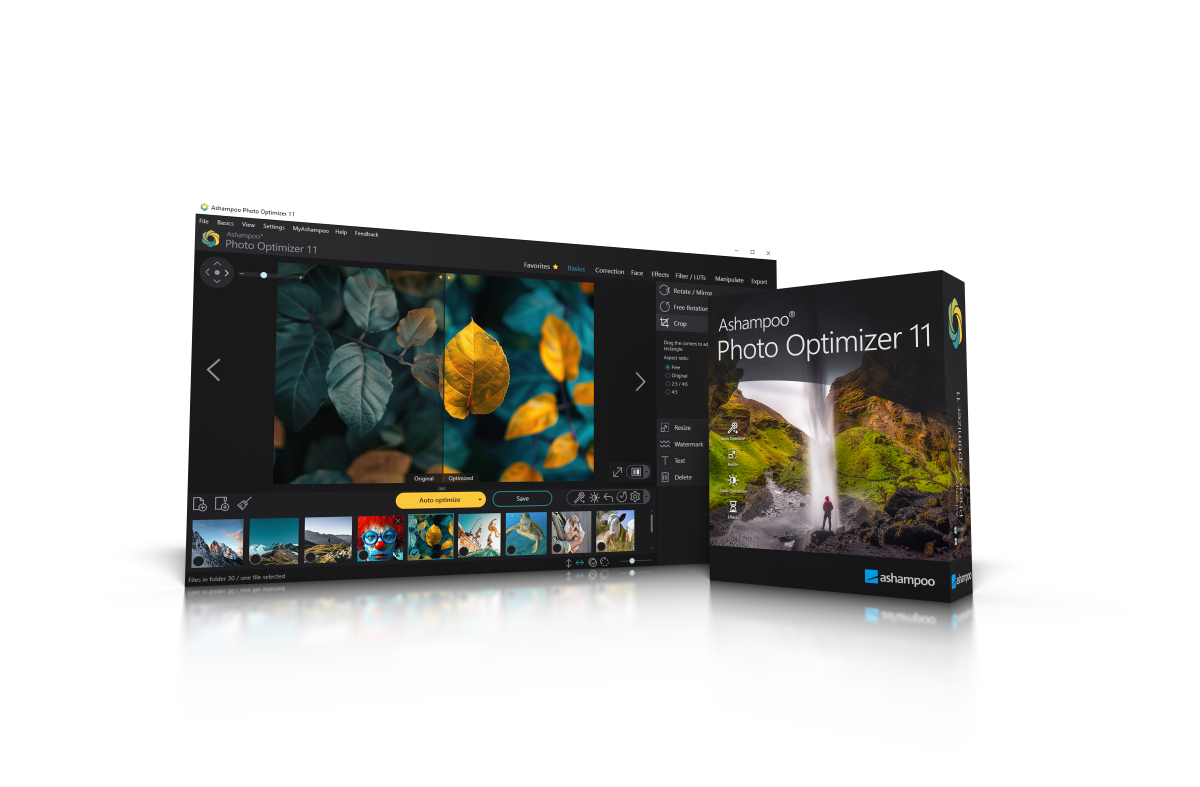
The user interface of Ashampoo Photo Optimizer 11 is designed with clarity and accessibility in mind. Navigation is structured around a clean, minimalist layout that prioritizes essential tools and functions. The main workspace displays the selected image, with side panels housing adjustment sliders, LUT libraries, and effect presets. Menus are logically organized, and common actions like rotation, flipping, and cropping are easily accessible via context-sensitive buttons.
Interaction flow is intuitive—users can switch between automatic and manual modes seamlessly, and changes are previewed in real time. Although the developer did not list formal performance metrics, the application appears to handle standard image formats efficiently across various device configurations. Responsiveness remains consistent during editing sessions, and the software maintains stability even when processing multiple images simultaneously. The absence of reported crashes or freezes suggests reliable operation, though no specific testing data was provided. Overall, the experience is smooth and focused on usability, minimizing distractions and enabling users to concentrate on their creative goals.
Platform Compatibility & Technical Requirements
Ashampoo Photo Optimizer 11 is available exclusively for Windows operating systems. The software requires a minimum of 1.3 GB of disk space for installation, which is standard for applications with robust image processing capabilities. The version number is listed as 11, indicating it is the latest release in the series. However, the developer did not specify minimum OS requirements or compatibility with older Windows versions.
While the application is designed for desktop use, no information was provided about support for touchscreens, high-DPI displays, or integration with external hardware such as graphics tablets. Users should ensure their system meets general desktop standards for running image editing software. Compatibility with other platforms such as macOS, Android, or iOS was not confirmed. The lack of detailed technical specifications means users are advised to verify system readiness before installation.
Pros and Cons
Pros
- One-click optimization delivers instant, noticeable improvements to image quality.
- Extensive library of 45+ LUTs enables quick mood and style transformation.
- Intuitive interface allows users to edit photos without prior experience.
- Combines automation with manual control for flexible editing workflows.
- Includes specialized tools for portrait enhancement and creative effects.
Cons
- Platform availability limited to Windows only.
- Specific system requirements were not disclosed.
- No information on cloud sync, cross-device access, or mobile compatibility.
- Advanced features may not appeal to professional photographers seeking deeper control.
- Price point of $29.99 may be considered high for casual users.
FAQ
Is Ashampoo Photo Optimizer 11 safe to download and install?
Yes, the software is distributed through official channels and does not contain malware or intrusive ads. However, users should always download from trusted sources to ensure security.
Can I use Ashampoo Photo Optimizer 11 on multiple devices?
The developer did not specify licensing terms for multi-device use. Users should consult the official license agreement for details on installation limits.
Does the app support batch processing?
Yes, the one-click optimization feature supports processing entire folders of images at once, improving efficiency for users with large photo libraries.
Is there a free version or trial available?
The provided information does not mention a free trial or demo version. Users should check the official website for availability of trial access.
How often are updates released?
While the release date is listed as August 3, 2023, no information was provided about the frequency of future updates or patch releases.
Final Thoughts
Ashampoo Photo Optimizer 11 stands out as a practical, feature-rich solution for users seeking to enhance their photos with minimal effort. Its automatic optimization engine, combined with a diverse set of creative tools and professional-grade LUTs, makes it ideal for both casual users and content creators who value speed and visual impact. The intuitive interface ensures a low barrier to entry, while the inclusion of manual editing options allows for deeper customization when needed.
Though limited to Windows and lacking detailed system requirements, the app delivers a reliable and efficient editing experience. For anyone looking to elevate their photo quality without investing in complex software, Ashampoo Photo Optimizer 11 offers strong value. Whether enhancing family memories or preparing images for digital sharing, this tool simplifies the process while maintaining creative freedom.
Download Ashampoo Photo Optimizer 11 now
Guides & Tutorials for Ashampoo Photo Optimizer 11
How to install Ashampoo Photo Optimizer 11
- Click the Preview / Download button above.
- Once redirected, accept the terms and click Install.
- Wait for the Ashampoo Photo Optimizer 11 download to finish on your device.
How to use Ashampoo Photo Optimizer 11
This software is primarily used for its core features described above. Open the app after installation to explore its capabilities.
User Reviews for Ashampoo Photo Optimizer 11 0
No reviews found


